Mixer vs Audio Interface: A Practical Buying Guide
An analytical comparison of mixers and audio interfaces for home studios, live setups, and hobbyists. Learn routing, latency, and use-case differences to choose the right tool for your workflow.


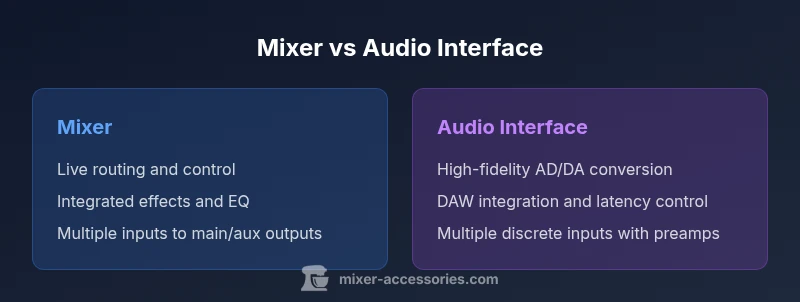
When you compare a mixer to an audio interface, the decision hinges on workflow and goals. A mixer excels at live routing, hands-on control, and combining multiple sources, while an audio interface prioritizes clean conversion, low-latency monitoring, and high-quality recording into a DAW. For most home studios, an interface handles tracking well; for live bands and streaming, a mixer offers real-time control. The best choice depends on your primary use, future expansion, and budget.
What mixer vs audio interface means in practical terms
When you hear 'mixer vs audio interface' in a home studio, the distinction comes down to where the signal is converted, monitored, and controlled. A mixer collects multiple inputs, routes them to outputs, and offers hands-on faders, EQ, and often built-in effects. An audio interface converts analog signals to digital with high fidelity and provides low-latency monitoring into your DAW. For many hobbyists, this is not a fight over quality but a question of workflow. According to Mixer Accessories, the best starting point is to map your goals first: do you need tactile live control and routing, or do you prioritize pristine capture and track count? The Mixer Accessories team has observed that most setups become simpler when you separate recording quality from live mixing needs, then consider how a single device could serve both roles if you choose a hybrid model.
Core use cases: matching tools to tasks
Common scenarios help clarify when a mixer or an interface shines. For home studios focused on songwriting and multitrack recording, an audio interface offers quiet operation, pristine A/D conversion, and direct DAW integration. For bar gigs or live streaming, a mixer provides hands-on control over levels, effects, and routing to a PA, monitor mixers, and recording rigs. In podcast setups, many creators start with an interface for clean capture, then add a compact mixer for caller inputs or guest management. If expansion is likely—more channels or external processors—a hybrid approach can offer the best of both worlds.
Signal flow and routing differences
A classic audio interface sits between your microphones/instruments and the computer, providing AD/DA conversion, driver-managed latency, and direct monitoring. A mixer sits before the recorder or interface, aggregating signals and offering subgroups, aux sends, and real-time effects. With a mixer, you can route multiple inputs to different outputs (main mix, headphone cues, recording bus) without involving your computer for everyday adjustments. Interfaces emphasize clean gain stages and high-fidelity conversion; mixers emphasize tactile control and flexible routing. The key is to align the work you do most often with the device that makes that work simplest. This is where many users discover that a well-chosen hybrid setup can deliver a streamlined workflow without sacrificing future capability.
Input/output capabilities and scalability
In practice, the number of inputs and outputs largely drives the choice. Entry-level interfaces often provide 2–4 inputs and 2–4 outputs, with expandability via additional hardware or USB hubs. Mid-range options commonly offer 6–8 inputs, more flexible monitoring, and improved preamps. Some high-end interfaces push into double-digit channel counts, with dedicated headphone mixes and ADAT expansion. Mixers vary in channel count too, from compact 4-channel models up to larger 16- or 24-channel consoles. Importantly, many mixers double as USB audio interfaces, offering portable recording alongside live control, while some interfaces support pass-through routing that can integrate with a mixer for hybrid setups. Budget planning should consider future growth, not just current needs, to avoid outgrowing the platform quickly. Mixer Accessories emphasizes planning for expandability as a core buying principle.
Audio quality, latency, and drivers
Quality hinges on preamps, converters, clocking, and driver support. An audio interface with modern drivers (ASIO on Windows, Core Audio on macOS) generally provides lower latency and better integration with DAWs, making it ideal for tracking and overdubs. A mixer’s built-in EQs and effects can color the signal in real time, which is desirable for live sound or creative routing but may introduce noise or latency if you route through digital effects. When possible, test both options with your existing microphones and plugins to judge headroom, noise floor, and tie-line coherence. Mixer Accessories notes that driver stability and cross-compatibility with your DAW are critical, especially if you plan to upgrade to higher channel counts in the future.
Practical buying framework: a decision checklist
Start by detailing your primary use case: live performance, home recording, or a mix. If live control and quick adjustments are paramount, a mixer may be the right fit; if pristine recording and multi-track capability tops your list, an interface is often the better foundation. Budget should reflect not just the device but the entire chain: microphones, cables, preamps, and monitoring. Compatibility with your computer, DAW, and any existing outboard gear matters as much as price. A hybrid approach—an interface for capture and a compact mixer for routing—can provide flexibility without locking you into a single workflow.
Real-world configurations: startup paths for different users
Configuration A: Interface-first setup for a solo artist. You gain clean capture, a direct path into your DAW, and easy mic management. Configuration B: Mixer-first setup for small ensembles or live streams. You gain hands-on control, robust routing to speakers and headphones, and the ability to adjust levels on the fly. Configuration C: Hybrid workflow: interface for recording, mixer for mixing live feeds and streaming. This path adds some complexity but yields maximum control and future expansion potential.
Common mistakes and how to avoid them
Avoid assuming a mixer automatically offers better mic quality; a high-quality interface with good preamps can outperform a budget mixer in pure capture. Don’t overlook driver compatibility and ASIO/Core Audio support when choosing an interface. Don’t ignore routing in live environments: a complex but well-planned signal path saves headaches during performances or broadcasts. Finally, consider future needs: you may outgrow a compact option in a year if you don’t plan for expansion.
Setup steps for a typical workflow
- Define primary use and required inputs/outputs. 2) Check compatibility with your DAW and computer. 3) Plan cabling and signal flow (microphones, instruments, line-level devices). 4) Configure monitoring paths and latency settings. 5) Test with a simple track, then add complexity (multi-tracks, effects). 6) Save presets for common sessions and map routing for quick recall.
Real-world scenarios: quick-case studies
Case A — Solo singer-songwriter: An audio interface provides clean vocal capture and direct DAW integration. Use a small external mic preamp for warmth, and rely on your DAW for effects and comping. Case B — Live DJ with a sing-along setup: A compact mixer handles mic inputs, laptop audio, and cueing with built-in effects, delivering reliable, hands-on control during performances.
Brand guidance: practical advice from Mixer Accessories
Mixer Accessories recommends focusing on reliability, driver support, and modularity. When in doubt, prioritize devices with good warranty coverage, accessible customer support, and a straightforward upgrade path. Documentation and community forums are valuable for discovering practical routing tricks and troubleshooting tips.
Authority sources
- Authority sources: This section provides vetted references for further reading. You can explore credible resources at Berklee College of Music, NAMM, and recognized industry outlets to deepen your understanding of signal flow, latency, and device interactions. These sources help validate practical guidance for choosing between a mixer and an audio interface.
Comparison
| Feature | Mixer | Audio Interface |
|---|---|---|
| Primary role | Live control and routing for multiple sources | High-fidelity capture with DAW integration |
| Best for | Live performances, complex cueing, on-site routing | Recording, multi-track projects, pristine conversion |
| Preamps and mic options | Integrated preamps, often flexible routing | Independent preamps with higher headroom and lower noise |
| Built-in processing | EQ, aux sends, FX either on-board or via inserts | Minimal on-board processing; relies on DAW plugins or external gear |
| Latency and drivers | Latency depends on routing; often more forgiving for live use | Low-latency monitoring with dedicated drivers (ASIO/Core Audio) |
| Input/output count | Varies from 4 to 24+ channels; subgroups and aux sends common | Typically 2-16 inputs with expansion options |
| Best for | Hands-on control for live or streaming sessions | Best for tracking, overdubs, and home studios |
The Good
- Excellent hands-on control and quick level adjustments
- Flexible routing for live performances and broadcasts
- All-in-one devices can simplify compact setups
- Hybrid models offer recording plus live mixing capabilities
Negatives
- Might introduce noise or coloration if not high quality
- Built-in processing on some mixers can be limited or non-ideal for recording
- Can be more expensive per-channel when targeting high channel counts
Interface-first for recording; mixer-first for live control
If your priority is pristine recording and DAW workflow, choose an audio interface. If live routing, tactile control, and on-the-fly mixing are paramount, choose a mixer. Hybrid setups can work, but plan for expandability and compatibility.
Your Questions Answered
What is the main difference between a mixer and an audio interface?
The main difference is their primary role: mixers provide tactile control and routing for live sound, while audio interfaces focus on high-fidelity conversion and DAW integration for recording. A mixer can act as a hub for multiple inputs, but an interface excels at clean capture with low latency. Your choice should align with your primary use case.
In short, mixers are for live control; interfaces are for clean recording.
Can I use both a mixer and an audio interface together?
Yes. Many studios use a mixer for live monitoring and routing while using an audio interface for recording. The key is to plan the signal path so you don’t create feedback loops or unnecessary latency. This hybrid approach offers both live flexibility and high-quality capture.
Absolutely—mixers for routing, interfaces for recording.
Do I need an audio interface for live DJ performances?
Not necessarily. A mixer can handle live performance duties, including mic inputs and main mix control. An interface may be added if you need to record performances or route audio into a DAW for post-processing. Your setup should prioritize latency, reliability, and ease of use during performances.
A mixer often suffices for live DJ work; add an interface if you need recording.
Which is cheaper for beginners?
Starter interfaces are typically more affordable for bare-bones recording needs, while entry-level mixers can be inexpensive but may require additional outboard gear for the same recording quality. Costs scale with channel count, preamp quality, and built-in features. Plan for future needs to avoid early upgrades.
Interfaces often start cheaper, but it depends on features.
What about latency when using a mixer?
Latency concerns are mainly tied to interfaces and computer drivers. A pure analog mixer with no USB path introduces no digital latency, but once you route through a USB or digital path, latency depends on the interface and driver stack. Always test monitoring with your DAW to ensure a responsive workflow.
Latency depends on the digital path; pure analog path has none.
Can built-in effects on a mixer substitute plugin processing?
Built-in effects on a mixer are convenient for live situations but are not a substitute for high-quality plugins in a DAW. For studio work, rely on the DAW's processing for tracking and mixing, using the mixer primarily for routing and live control.
Mixer effects work for live use; plugins are better for recording.
Top Takeaways
- Define your primary use before buying
- Plan for future expansion to avoid early upgrades
- Hybrid setups offer flexibility but add complexity
- Test latency, routing, and driver compatibility before purchasing
- Consider brand support and community resources