Mixer vs Audio Interface for Recording: A Practical Comparison
A detailed, analytical comparison of mixers and audio interfaces for recording. Learn which setup fits home studios, podcasts, and music projects, with practical workflows, checklists, and budget guidance from Mixer Accessories.


Choosing between a mixer and an audio interface for recording depends on your goals and setup. For most home studios, an audio interface offers clean preamps, low latency, and straightforward plugin workflows. A mixer adds hands-on control, flexible routing, and enhanced live monitoring when needed. Start with an interface, and add a mixer only if tactile control or complex routing is essential.
Why the Mixer vs Audio Interface Debate Matters
For recording in home studios, the choice between a mixer and an audio interface influences sound quality, workflow, and future scalability. According to Mixer Accessories, the decision hinges on your recording goals, the size of your setup, and whether you need tactile control or clean digital capture. The Mixer Accessories team found that most hobbyists start with a high-quality interface to capture tracks cleanly, then add a mixer only if hands-on monitoring or routings become essential. In practice, you should map your typical sessions: one or two vocal tracks, a guitar or keyboard, and occasional external effects. If you require multiple live inputs, external processors, and instant headphone mixes for performers, a mixer can be a practical add-on. If you primarily record solo or with a couple of mics and rely on software for processing, an interface is the simplest and most cost-effective path. This article breaks down the essential differences, real-world workflows, and decision criteria so you can pick the setup that matches your goals.
Core Definitions: What Each Device Does
An audio interface is a low-latency bridge between your microphones, instruments, and computer. It converts analog signals into digital data that your DAW (digital audio workstation) can record and process, while providing mic preamps and monitoring options. A mixer, by contrast, is a hardware mixer that combines multiple audio sources, offers direct control over levels, panning, and effects, and often provides built-in outputs for stereo monitoring or live sound. While some mixers include USB interfaces, their focus is on analog signal management and hands-on routing rather than multi-track audio capture. Understanding these core functions helps you evaluate how each tool fits your recording style, whether you’re tracking drums, podcasts, or guitar rigs.
Key Differences at a Glance
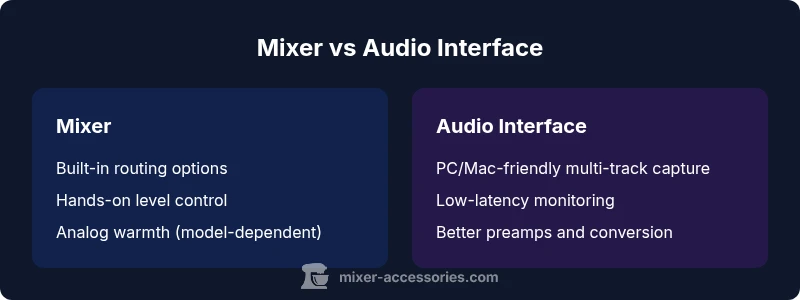
- Input and routing flexibility: Mixers excel at analog, tactile routing with multiple sends and subgroups; interfaces excel at DAW-native multi-track capture.
- Latency and monitoring: Interfaces emphasize low-latency monitoring and software integration, while mixers offer hardware monitoring with hands-on control.
- Sound shaping and processing: Mixers provide built-in EQs, dynamics, and effects on the hardware path; interfaces rely on plugins and external processors.
- Expandability and future-proofing: High-channel-count interfaces scale in the digital domain; mixers scale through auxiliary sends and outboard gear.
- Price and maintenance: Entry-level interfaces are often cheaper upfront for clean captures; larger analog mixers can become a significant investment but may simplify live routing.
Use-Case Scenarios: When a Mixer Makes Sense
If you host live streams or multi-mic podcasts with real-time headphone mixes, a mixer can simplify on-the-fly control and audience monitoring. Analog warmth and color from certain mixer preamps can appeal to vocal tracks or guitar rigs that benefit from immediate, hands-on adjustment. When you run external effects or hardware processors, a mixer provides a central hub for routing those elements to the DAW or to your performers. In small spaces, a compact mixer with USB can remove some cable clutter while offering a physical mixer experience. Finally, if you value tactile mastery of levels during performances or quick reference monitoring, a mixer remains hard to beat for immediate, non-DAW-based adjustments.
Use-Case Scenarios: When an Audio Interface Makes Sense
For most home studios, recording clean, track-by-track is the priority. An audio interface provides high-quality mic preamps, better impedance matching for musical instruments, and straightforward multi-track capture into your DAW. Interfaces tend to integrate with software control panels, offer low-latency monitoring, and allow easier plugin chaining and frequent upgrades as your project scope grows. If you’re recording a singer-songwriter, a podcast with a few mics, or a band setup with multi-track drums, an interface usually delivers the most efficient workflow with better long-term scalability. In portable setups, a compact USB-C interface can replace heavier hardware while preserving sound fidelity.
Practical Workflow: Recording with a Mixer
A typical mixer workflow starts by connecting microphones and instruments to the mixer’s XLR/line inputs. Set gain staging on each channel, and enable phantom power where needed for condenser mics on compatible channels. Use the mix bus and auxiliary sends to create a cue mix for performers and a main stereo output for your DAW. Route the main stereo outputs to your audio interface or computer input, then arm the DAW tracks for recording. Use the mixer’s built-in EQ and dynamics subtly to shape the live sound before it hits the recording chain. Maintain consistent levels across mics to prevent clipping and ensure clean separation in your final mix. Finally, monitor through the mixer for an immediate sense of how the performance will translate in the final mix, while keeping a reference track in the DAW.
Practical Workflow: Recording with an Audio Interface
Begin by connecting mics and instruments to the interface’s inputs via XLR or instrument cables. If your interface supports phantom power, enable it for condensers. In your DAW, create separate tracks for each input; name them clearly (e.g., Vocals, Guitar, Acoustic). Set appropriate input levels and buffer size to balance CPU load and latency. Use direct monitoring if your interface offers it to avoid DAW-induced latency during performance. Apply plugins in the track’s chain for noise reduction, compression, or EQ, then adjust the mix using your headphones or studio monitors. For podcasts or multi-track recording with guests, consider routing auxiliary outputs to a separate mix for an external recorder or streaming device. The interface-centric workflow emphasizes clean tracking, flexible editing, and easier collaboration in post-production.
How to Evaluate First: A Quick Checklist
- Input count and future expansion: Do you need multiple mics or instruments now, and later?
- Latency and monitoring: Is near-zero latency essential for performance or overdubbing?
- Sound quality vs convenience: Do you prefer hardware coloration or pristine convertors and preamps?
- Workflow and DAW integration: Are there features you rely on in plugins or software control?
- Budget and space: What fits your room and wallet while allowing growth?
Hybrid Setups: When to Combine
Hybrid setups blend strengths of both devices. For example, you can use an audio interface as the central recording hub and add a small mixer for performers to dial in their own headphone mixes and level control. Alternatively, use a mixer in the monitoring path while the interfaces handle all DAW recording channels, providing tactile control without sacrificing multi-track capture. The right hybrid solution depends on your room, number of performers, and whether you want to preserve analog warmth, real-time routing, or software-driven processing during mixing.
Budget and Long-Term Costs: TCO Considerations
When evaluating cost, consider both upfront price and long-term ownership. Entry-level interfaces typically offer excellent value for clean captures and straightforward workflows. Larger analog mixers or multi-channel digital mixers can carry higher upfront costs but may reduce reliance on software for routing and monitoring in live or semi-live contexts. Plan for upgrades: you may want to expand input counts, add outboard gear, or switch to a more powerful DAW setup in a few years. Maintenance, cables, power supplies, and cases should factor into total cost of ownership. Remember that the best choice aligns with your current needs and leaves room for growth without forcing a complete system overhaul.
Comparison
| Feature | Mixer | Audio Interface |
|---|---|---|
| Input count | 2-18+ channels (varies by model) | 2-18+ inputs (varies by model) |
| Preamps & phantom power | Mic preamps on channels; phantom power on select models | Dedicated mic preamps; phantom power widely available |
| Direct monitoring | Hardware monitoring via mixer with dedicated knobs | Software/hardware latency-free monitoring via interface |
| Latency impact | Low latency in hardware path; depends on routing | Low latency via DAW with buffer control |
| Routing & expandability | Analog routing, auxiliaries, subgroups | DAW-based routing, multiple software buses |
| Best for | Live monitoring, multi-mic performances, on-device effects | Clean tracking, multi-track recording, plugin-heavy workflows |
| Price range | Low-to-mid for compact/mid-sized mixers | Mid-to-high for multi-channel interfaces |
The Good
- Offers tactile control and immediate monitoring when needed
- Can simplify live performances and cue mixes
- Hardware routing can reduce DAW CPU load
- Hybrid setups allow flexible workflows
- High input counts in mixers and interfaces enable future growth
Negatives
- Can be more expensive upfront for high-end models
- Mixers add analog coloration that may not suit every style
- Routing complexity can overwhelm beginners
- Software reliance on interfaces can be a single point of failure
Audio interfaces are the best starting point for clean recording; mixers excel in hands-on monitoring and live routing.
Start with an interface for reliable capture and easy post-production. Add a mixer later if you value tactile control, multi-mic cueing, or complex analog routing in live scenarios.
Your Questions Answered
Can I use a mixer as an audio interface?
Some mixers include a USB or ATAPI interface built-in, allowing direct computer connection for multi-channel recording. If your mixer lacks USB or Thunderbolt, you’ll need a separate audio interface to capture digital audio. Always verify inputs, sample rates, and driver support.
Some mixers have built-in USB interfaces; otherwise, you’ll need a separate audio interface for digital recording.
Is latency a concern with a mixer?
Latency is primarily a consideration when routing through software. Hardware monitoring on a mixer can be nearly latency-free, but if you route through a computer, expect some delay depending on your buffer size. Plan your monitoring path accordingly.
If you monitor directly on the mixer, latency is minimal; through a computer, latency depends on your DAW settings.
Which setup is best for podcasting: mixer or interface?
For simple podcasts, a high-quality interface with a USB mixer for monitoring can work well. If you need multiple mics with independent mixes for guests, a mixer-based setup may be more convenient. Consider your preferred workflow and whether you need on-the-fly editing or post-production flexibility.
For podcasts, start with an interface; add a mixer if you need multi-mic cueing and easy on-air monitoring.
Do I need phantom power for condensers?
Yes, most condensers require phantom power. If your mixer provides phantom power on XLR channels, you can use condensers there; otherwise, use the interface’s phantom power or separate power supplies. Check each channel’s potential for phantom power to avoid mics failing to operate.
Most condensers need phantom power; check your device’s phantom power availability on the channels you plan to use.
Can a mixer handle multi-track recording?
Traditional analog mixers are not designed for multi-track recording in the same sense as an interface. Some mixers offer USB multitrack outputs, but the most straightforward path for multi-track recording remains an audio interface. Hybrid setups can bridge both worlds.
If you need true multi-track recording, an interface is usually the better tool; mixers excel in live monitoring and routing.
What about standalone recorders vs computer recording?
Standalone recorders can simplify mobile or field work, but you’ll trade DAW flexibility for portability. A computer-based setup with an audio interface offers advanced editing, plugins, and precise control. Your choice depends on portability needs and desired editing capabilities.
Standalone recorders are portable but offer less editing flexibility than computer-based DAW workflows.
Top Takeaways
- Start with an interface for clean tracking and easy DAW integration
- Add a mixer when live monitoring and hands-on routing are priorities
- Evaluate input count, latency, and routing needs before buying
- Hybrid setups can balance the strengths of both devices
- Budget for future growth and compatibility with your DAW