Audio Mixer vs Interface: A Practical Buying Guide for 2026
Explore the differences between audio mixers and audio interfaces, when to choose each, and practical guidance for home studios, podcast setups, and live rigs. Learn how to decide based on inputs, routing, latency, and future needs from Mixer Accessories.


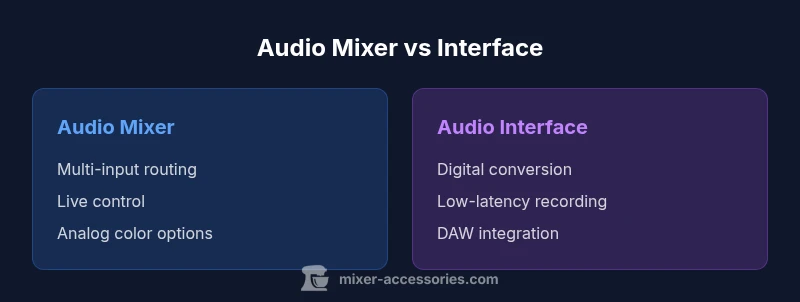
In the world of audio gear, the key question is audio mixer vs interface: a mixer handles live input mixing and routing, while an interface converts analog signals to digital for a computer. For most home studios, a small interface covers basic recording; add a mixer when you need hands-on control for multiple sources and live blending. The right choice depends on your workflow, inputs, and whether you value tactile control or pristine DAW-ready sound.
Understanding the Core Distinction: audio mixer vs interface
In modern home studios, the terms mixer and interface describe two different roles in the signal chain. The phrase audio mixer vs interface is often used to contrast live control with digital capture. According to Mixer Accessories, the best way to think about them is: a mixer focuses on combining multiple analogue sources, routing them to a single output path or subgroups, while an audio interface focuses on converting those analogue signals to digital signals for a computer and DAW. The distinction is about workflow as much as around electronics. If you frequently run several microphones, instruments, or line-level devices at once, a mixer can give you tactile control over levels, panning, and effects, with immediate monitoring on the analog path. In contrast, an interface emphasizes the conversion quality and the software side, delivering pristine signal fidelity for recording, editing, and mixing inside a DAW. When choosing between them, consider your primary tasks: live mixing and on-the-fly routing versus studio recording and DAW-based production. The broad advantage of a well-chosen setup is not just sound quality; it's the reliability of the workflow and how quickly you can translate performance into a usable track.
Use Cases and Setups
The decision between an audio mixer and an interface often hinges on the work you do most days. The typical user includes home studio enthusiasts, podcasters, live streamers, small-venue setups, and educators exploring practical audio physics. Consider these representative scenarios:
- Home multitrack recording: A compact interface with 2-4 inputs and solid driver support is a sensible start. You gain clean saturation-free capture and flexibility to process in your DAW, with the option to upgrade to a higher-channel interface as your needs grow. A separate mixer becomes valuable if you want to blend multiple mic feeds before digitizing them, or if you frequently perform with live instruments.
- Podcasting or streaming: If you host guests or run a multi-mhot platform, a small mixer with USB audio interface capability can route several mics and a talkback line to your computer while letting you monitor levels on the fly. This setup reduces latency and makes it easier to keep conversations balanced.
- Live streaming or small gigs: A mixer shines here for real-time level control and effects; you can send a single main mix to the venue or stream and route individual channels to subgroups for processing. Portability becomes a factor; choose a compact, bus-powered option for on-the-go use.
- Studio ergonomics and future-proofing: If you anticipate expanding inputs—guitars, keyboards, percussion—consider a mixer that can expand or a larger interface with more I/O. The two solutions are not mutually exclusive, and many setups blend both. In this context, the Mixer Accessories team notes that the best setup prioritizes your daily routine, instrument mix, and how quickly you want to translate performance into a track.
From a practical perspective, your choice should map to how you work most of the time. If you’re primarily recording for a DAW, an interface delivers clean, precise results; if you’re performing live or juggling several inputs with on-the-fly routing, a mixer brings immediate control. The goal is a workflow that feels natural and reliable in everyday use.
Key Technical Differences
The heart of the audio mixer vs interface question lies in core technical differences that impact sound and workflow. First, input topology: a mixer aggregates several line- or mic-level sources directly on a physical console, often with built-in preamps and signal processing. An interface focuses on high-fidelity conversion—analog-to-digital and digital-to-analog—with the goal of minimal interference and accurate capture in your DAW. Preamps: mixers may color the signal with their own op-amps and headroom characteristics, which some users prefer for musical warmth; interfaces emphasize clean, transparent conversion to preserve source details. Routing: mixers offer live routing, subgroups, and auxiliary sends that enable real-time effects and monitoring for multiple sources. Interfaces typically rely on software routing inside the DAW, which provides flexible editing but requires more CPU and software familiarity. Monitoring: direct monitoring is often straightforward on a mixer, resulting in near-zero latency for live performers. Interfaces deliver monitoring through the computer path, usually with low-latency settings but potential DAW-induced delay. Finally, power and form factor: many mixers are larger and require more cabling and power unless they are compact USB-capable models; interfaces range from portable two-channel units to multi-channel desktop devices that fit into a laptop bag.
How to Decide: Quick Rules
To decide quickly, map your workflow to a handful of criteria:
- Primary task: If recording into a DAW is your main goal, start with an interface. If live mixing and real-time routing are core, start with a mixer.
- Input count: Count the mics and line-level sources you routinely manage. If you regularly exceed two or four, a mixer or a larger interface becomes attractive.
- Monitoring needs: Do you need zero-latency live monitoring for performers? A mixer can deliver that on the analog path, while an interface will rely on DAW monitoring and driver buffers.
- Space and portability: If you travel or have limited desk space, an ultra-compact interface may beat a larger mixer.
- Budget and upgrade path: Interfaces generally offer better value for single-task recording; mixers become cost-effective when you need robust live control at scale.
A practical rule: if your work centers on achieving pristine capture and ease of DAW integration, favor an interface; if your work requires hands-on, tactile control across many inputs, favor a mixer.
Practical Setups: Budget Paths
Two practical routes illustrate how beginners and intermediate users can approach the topic without overspending. These paths assume you want a balanced setup for a small home studio or podcast booth.
- Path A — Interface-first, budget-conscious: A two-input or four-input USB/USB-C interface with phantom power for condensers, reliable drivers, and good preamps. Expect a price range in the mid-$80s to mid-$400s, depending on I/O, bus power, and included software. You gain clean recording, low-latency monitoring, and a straightforward workflow, with room to upgrade to higher-channel interfaces later.
- Path B — Mixer-first, mid-range: A compact mixer with 4-8 inputs and an integrated USB audio interface or direct USB connection. This path emphasizes live mixing and routing experience, with a price range roughly in the low hundreds up to about a thousand dollars for larger consoles. You’ll enjoy tactile control, easy multi-source management, and the ability to produce a live mix before digital capture.
Performance and Sound Characteristics
Sound coloration and performance are the undercurrents in any decision about audio gear. A traditional analog mixer often imparts a musical warmth due to its discrete circuitry, transformer-free preamps, and the interaction between channels, buses, and EQ sections. Some users prize that character for vocals and guitars when recording with analog gear. On the other hand, an audio interface is designed to minimize coloration, prioritizing transparent capture, wide dynamic range, and accurate frequency response. It excels in preserving a performance’s true pitch, transient detail, and micro-dynamics when the goal is precise editing and mixing in a DAW. The choice also depends on your microphones and instruments: dynamic mics, ribbon mics, or condensers each respond differently to preamps and input impedance. For home studios relying on software-based effects and plugins, an interface provides the performance headroom and driver support needed to run multiple plugins without audio dropouts. When you add a dedicated mixer into the chain, you can apply effects at the analog stage or route subgroups with external processors for creative sound shaping.
Common Pitfalls and Troubleshooting
Even a well-chosen device can become a friction point if you overlook common setup pitfalls. Noise and hum are typical culprits in studio environments; check grounding, cable quality, and the use of balanced connections where possible. Phantom power remains a frequent source of confusion for newcomers: ensure your mics and preamps are compatible and that you don’t feed phantom power into equipment that cannot tolerate it. Driver conflicts can cause dropouts or misrouting; keep firmware and drivers up to date and verify your DAW’s audio device settings. Monitoring mistakes—such as monitoring through the DAW while the interface buffer is too high—can produce click/pop artifacts. When using a mixer with an interface, mind the order of operations: the mixer’s main outputs should feed the interface’s inputs, not the other way around, to avoid phase and latency issues. Cable management matters too: color-coded, labelled cables reduce mistakes and speed up troubleshooting. Finally, always test your signal chain step by step: microphone to preamp, to mixer (if used), to interface, then into the DAW.
Maintenance and Longevity
To maximize longevity, keep your equipment in a clean, climate-balanced environment; avoid placing gear directly on heat sources or in damp spaces. Regularly inspect cables for wear, replace frayed or kinked cables, and label connections to simplify future upgrades. Dust the controls gently with a microfiber cloth; use compressed air sparingly to avoid forcing dust into connectors. For mixers, check the faders and potentiometers for smooth operation; a little contact cleaner can help if you notice crackling, but apply sparingly. For interfaces, protect ports and USB connectors; avoid excessive power surges and unplug during electrical storms. Plan for upgrades by evaluating your needs: you might start with a small interface, then add a mixer for live work or a larger multi-channel unit as your home studio expands. Finally, when integrating computer software, keep your DAW tracks and plug-ins organized, and back up your project files and session templates regularly.
Comparison
| Feature | audio mixer | audio interface |
|---|---|---|
| Best For | Hands-on control for live mixing and routing of multiple inputs | Clean, DAW-integrated recording with low latency |
| Inputs/Channels | 2-16+ physical channels on mixers | 2-8 mic/line inputs common on interfaces; expand with higher-end units |
| Preamps/Conversions | Analog preamps with variable color and headroom | High-quality ADC/DAC with optimized latency |
| Monitoring/FX | Live monitoring, built-in EQ/FX options | Software monitoring via DAW with integrated effects |
| Phantom Power | Some models provide phantom power for mics | Most interfaces provide phantom power on inputs |
| Latency | Near-zero monitoring via analog path on some mixers | Dependent on USB/Thunderbolt buffer settings in interfaces |
| Portability/Footprint | Heavier, more cables; more inputs at a desk | Compact, bus-powered units for mobile setups |
| Price Range | Entry to pro-level mixers ($100-$1500+), higher for bigger rigs | Entry to mid-range interfaces ($80-$800), higher with more channels |
The Good
- Hands-on control for multiple inputs and live routing
- Flexible routing, subgroups, and direct monitoring
- Can function as a standalone solution for small venues
- Integrated effects on some mixers can reduce DAW load
- Good value for hybrid setups that require both live and recording capabilities
Negatives
- Bulky and less portable than compact interfaces
- Analog coloration may add noise or coloration not ideal for pristine recording
- Requires more cabling and power management
- Some features and drivers can be model-dependent
Interface-first for clean recordings; mixer-first for live control and complex routing.
If your priority is recording into a DAW with minimal fuss, an interface is typically the better starting point. If you frequently mix multiple inputs live or need tactile control across several channels, a mixer adds valuable workflow advantages.
Your Questions Answered
What is the difference between an audio mixer and an audio interface?
An audio mixer aggregates multiple inputs with levels and routing for live or recorded output, often with analog processing. An audio interface converts analog signals to digital for your computer, prioritizing clean conversion and low latency.
A mixer handles many sources at once; an interface sends clean digital signals to your computer.
When should I buy a mixer versus an interface?
If you need hands-on control for multiple inputs and live mixing, a mixer is ideal. If your main goal is recording into a DAW with minimal hardware, an interface is typically the better starting point.
If you record at a desk, start with an interface; for live multi-mic setups, consider a mixer.
Can I use both in a home studio?
Yes. Many home studios combine both: use a mixer for front-end control and an interface to feed your DAW. Some mixers include built-in USB audio interfaces to simplify the setup.
Yes—mixers plus interfaces can complement each other in a small studio.
Latency and monitoring differences?
Interfaces typically expose buffer-based latency; many offer direct monitoring to avoid DAW latency. Mixers provide immediate analog monitoring in the signal path, but USB-capable models vary in latency.
Direct monitoring on mixers can be latency-free; interfaces depend on buffer settings.
Do I need phantom power?
If you use condenser mics, you will likely need phantom power, which many interfaces provide on their inputs and some mixers do as well. Check your mic and device specs.
Condenser mics often require phantom power; verify your device specs.
How do I decide on price and value?
Interfaces generally offer strong value for straightforward recording. Mixers can be a smarter long-term investment if you expect to expand inputs or perform live. Consider future needs and total cost of ownership.
Evaluate future needs and total cost before buying.
Top Takeaways
- Assess primary use: recording vs live mixing
- Count inputs and routing needs before buying
- Consider latency, monitoring, and DAW integration
- Budget for future expansion and upgrade paths
- Test with your actual microphones and instruments