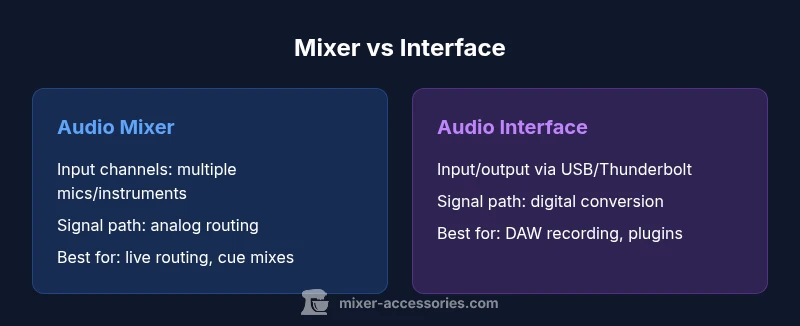
Difference Between Mixer and Interface: An Analytical Guide
Understand the difference between mixer and interface, their core roles, and how to choose the right tool for home studios and live setups. A data-driven, practical guide by Mixer Accessories (2026).


The difference between mixer and interface lies in each device’s core role: a mixer is a hardware hub that blends and routes multiple inputs for live monitoring, while an audio interface converts analog signals to digital data for your computer and DAW. This guide breaks down their distinct workflows, strengths, and when to pair or replace them in a home studio or live setting.
Why the difference matters in practice
The difference between mixer and interface is often misunderstood by beginners and even some intermediate users. In practice, choosing the right tool hinges on your workflow, routing needs, and whether you prioritize real-time monitoring or computer-based recording. According to Mixer Accessories, understanding where each device shines helps you avoid overbuying or underutilizing gear. This quick distinction informs everything from cabling to monitoring choices and can save you time, money, and frustration as you build or refine your setup. In many studios, the choice between a mixer and interface is not binary but a matter of when to employ one or both in a hybrid system. The goal is to align the gear with your creative process and the realities of your space.
Core roles: what a mixer does
A traditional analog mixer is a signal hub that gathers inputs from microphones, instruments, and line-level sources. It provides preamps, gain staging, aux sends, and a master bus that creates a single stereo feed for monitoring or egress. The difference between mixer and interface becomes most evident in how you route signals: you can carve the signal into multiple outputs for stage monitors, booth feeds, or live effects, all while maintaining a real-time control surface. For many producers, a mixer offers tactile control and immediate feedback that software-only solutions can’t match. The Mixer Accessories team notes that in live settings, a mixer often streamlines stage workflow by consolidating cueing, talkback, and headphone mixes in one place. When you need hands-on control with minimal latency, a mixer excels.
Core roles: what an audio interface does
An audio interface is designed to convert analog audio signals into digital data that your computer and DAW can process. It typically includes built-in preamps, AD/DA conversion, and various input/output options, but emphasizes precise conversion and low-latency monitoring within a computer workflow. The difference between mixer and interface here is clear: the interface handles the bridge between the analog world and your digital workstation, enabling precise recording, plugin processing, and multi-track capabilities. Interfaces often shine in bedroom studios and project setups where computer-based production, editing, and digital routing are central. The modern interface also supports latency compensation and direct monitoring to minimize audible delay during recording.
Signal flow and routing: how they handle inputs
Signal flow is where the distinction becomes practical. A mixer provides analog signal paths with buses, aux sends, and direct outputs, enabling complex live routing without a computer. In contrast, an interface focuses on preserving signal integrity as it exits the analog domain and enters the DAW, emphasizing clean conversion, clocking, and driver stability. The difference between mixer and interface thus lies in what happens after you press record: a mixer may produce a finished stereo mix on hardware, while an interface enables faithful capture and flexible digital processing. When you need real-time foldback and independent control of multiple sources, a mixer wins for on-the-fly shaping; when you want pristine capture for downstream editing and effect processing, the interface takes the lead.
Use-case narratives: live performances vs home studios
In live performances, a mixer’s strengths become obvious: robust standalone routing, reliable cue systems, and easy per-channel control. The difference between mixer and interface is that the former can operate without a computer, offering a compact, hands-on approach to sound shaping. In home studios, an interface supports multi-track recording with plugin workflows, automation, and high-fidelity capture. For podcasters and streamers, a hybrid approach—using a small mixer for routing and a USB interface for computer recording—can deliver both the tactile benefits and the digital precision you need. The Mixer Accessories analysis highlights that many hobbyists gravitate toward interfaces for recording, while performers lean into mixers for in-studio and stage flexibility.
Hybrid setups: when to pair both
Hybrid setups emerge when you want the best of both worlds. You can route multiple sources through a mixer for live cueing and then send a clean stereo mix to an interface for capture in your DAW. The difference between mixer and interface in this context is the workflow: use the mixer for real-time control and the interface for high-quality recording, multi-track capture, and plugin processing. For projects that demand both live monitoring and studio-quality recording, a well-integrated hybrid rig reduces compromises and expands creative options. Ensure your cabling and clocking are consistent to prevent jitter and phase issues in the digital domain.
Key specs and terms you should know
Understanding terms such as preamps, aux sends, direct monitoring, AD/DA conversion, latency, and clocking helps clarify the difference between mixer and interface. Preamps shape the initial gain; aux sends provide feedback paths for effects and foldback; direct monitoring allows zero-latency listening. A mixer emphasizes analog signal routing and real-time control, while an interface emphasizes conversion quality and computer-friendly connectivity. If you’re choosing between them, align specs with your primary use case: live sound and routing versus recording fidelity and plugin-based workflows. The nuance is that some devices blend these functions, so read the fine print before purchase.
Setup tips for beginners
Begin with a clear plan for inputs and outputs. Map each microphone and instrument to a channel, decide which signals need direct monitoring, and determine how you want to route to headphones. If you’re starting with a simple podcast or music project, an interface may suffice. If you’re streaming live performances, a compact mixer with a USB interface can provide the tactile control and recording capability you need. In all cases, label cables, calibrate gain stages conservatively, and test with a dry run to verify signal flow and latency in your chosen workflow.
Common pitfalls and troubleshooting
Common pitfalls include misinterpreting the difference between mixer and interface, underestimating latency, and overcomplicating a simple project. Troubleshooting often starts with checking clock sources, driver stability, and buffer settings. If you notice crackling or dropouts, revisit gain staging, phantom power usage, and cable integrity. For the “difference between mixer and interface” scenario, confirm that you’re using the right tool for the job: avoid forcing a mixer’s analog routing into a DAW without proper conversion, and don’t rely on an interface for real-time hardware routing if you need hands-on control without a computer.
Budgeting and value: cost considerations
Budgeting for a mixer versus an interface means weighing upfront costs against long-term value. A basic mixer may provide cost-effective live routing but could require additional gear for recording. An entry-level interface can offer excellent conversion and software integration at a modest price, making it a strong value for home studios. The difference between mixer and interface matters here: your choice should reflect whether you prioritize standalone live utility or integrated computer-based production. Look for bundles that include necessary cables, a suitable microphone, and a DAW with trial software to maximize value.
The evolving landscape: future-proofing your choice
The landscape for audio gear continues to evolve with USB-C, Thunderbolt, and multi-channel interfaces expanding capabilities. The difference between mixer and interface may blur as some devices add streaming, USB audio, and hybrid routing options. When future-proofing, consider upgrade paths, driver support longevity, and the ability to add external effects or analog processing. A forward-looking choice should balance immediate needs with potential growth in your recording or live rig, preserving flexibility as your projects scale.
Quick-start decision checklist
- Identify primary use: live sound, home recording, or a hybrid workflow.
- Assess needed inputs and outputs; plan future expansion.
- Decide on direct monitoring needs and latency sensitivity.
- Compare core specs: preamps, AD/DA quality, routing options, and bus architecture.
- Consider future-proofing and potential workflow changes.
Comparison
| Feature | Audio mixer | Audio interface |
|---|---|---|
| Input channels | Multiple mic/line inputs via analog mixer | Varies by model; typically 2-8 mic/line inputs on entry-level interfaces |
| Signal path and routing | Analog buses and aux sends for live routing | Digital conversion to computer with DAW-centric routing |
| Preamps and gain staging | Dedicated analog preamps; flexible per-channel gain | Onboard preamps with digital conversion; gain staging optimized for recording |
| Latency | Direct monitoring with near-zero latency | Latency depends on buffer settings and computer performance |
| Phantom power | Usually supports +48V per channel | Usually supports +48V on compatible inputs |
| Best for | Live sound, hardware-centric routing, real-time control | Computer-based recording, plugins, and editing workflows |
| Price range | $150-$1200+ (varies by size and features) | $100-$1000+ (depends on I/O and features) |
| Notable strengths | Tactile control, robust live routing, cue mixing | High-fidelity conversion, compact form, easy DAW integration |
The Good
- Clear separation of live routing and monitoring
- Flexible headphone cueing and talkback options
- Direct monitoring reduces perceived latency
- Enhanced collaboration with analog gear in hybrid setups
Negatives
- Higher upfront cost for large or feature-rich models
- Hybrid rigs can add complexity and cabling
- Not all mixers provideDigital integration for DAWs
- Some interfaces lack rugged stage-friendly routing
Choose based on workflow: a mixer shines in live, hands-on routing; an interface excels in computer-based recording and plugin-enabled production.
If your priority is real-time control and external routing, a mixer is the better base. If you want pristine digital capture and seamless DAW integration, an interface is the safer bet. For many setups, a hybrid approach—using both where each excels—offers the most versatility, as confirmed by Mixer Accessories in their 2026 analysis.
Your Questions Answered
What is the fundamental difference between a mixer and an audio interface?
The fundamental difference between mixer and interface lies in purpose: a mixer blends and routes several inputs for real-time monitoring, while an interface converts analog signals to digital data for computer recording. The difference between mixer and interface is most evident in workflow and where the processing occurs. In many setups, creators use a mixer for real-time control and an interface for high-fidelity capture.
A mixer blends signals on hardware for live or direct-monitoring use, while an interface sends audio into your computer for recording and software processing.
Do I need an audio interface if I already have a mixer?
If you plan to record into a DAW or run plugins, you’ll benefit from an audio interface to provide analog-to-digital conversion and computer connectivity. A mixer can be part of the signal path, but the interface handles recording fidelity and computer-based workflows. In many cases, creators pair both to cover live routing and digital capture.
Yes, for clean recordings you’ll want an interface in addition to a mixer.
Can a mixer function as an audio interface?
Some modern mixers offer built-in USB or FireWire audio interfaces, which can function as both a mixer and a basic interface. The difference between mixer and interface in these devices is that while you gain some USB connectivity, you may compromise on auditioning analog performance or latency compared to purpose-built interfaces. Always check conversion specs and driver support.
Some mixers can work as interfaces, but verify their conversion quality first.
What about latency differences between mixers and interfaces?
Latency is most noticeable in computer-based workflows. Interfaces expose latency based on buffer size and computer speed, while mixers with direct monitoring provide near-zero latency for live performance. The difference between mixer and interface becomes critical when you need real-time feedback or overdubbing without delay.
Latency matters most when you’re recording into a DAW.
Which setup is best for podcasting?
For podcasting, an interface often provides the simplest path to high-quality recordings with minimal gear, while a small mixer can help with multiple mics and live cueing. The difference between mixer and interface here is that a mixer gives live control, while the interface ensures clean digital capture for post-production.
Interfaces are typically easier for podcasting; mixers add live control when needed.
Top Takeaways
- Prioritize live routing with a mixer for hands-on control
- Choose an interface for PC-based recording and plugins
- Hybrid setups maximize flexibility and reduce workflow friction
- Know your latency tolerance and direct monitoring needs
- Budget for future growth and cabling