Difference Between DJ Controller and Mixer: A Practical Guide
Explore the difference between a DJ controller and a mixer, how they work, when to choose each, and practical buying guidance for home studios and live gigs.


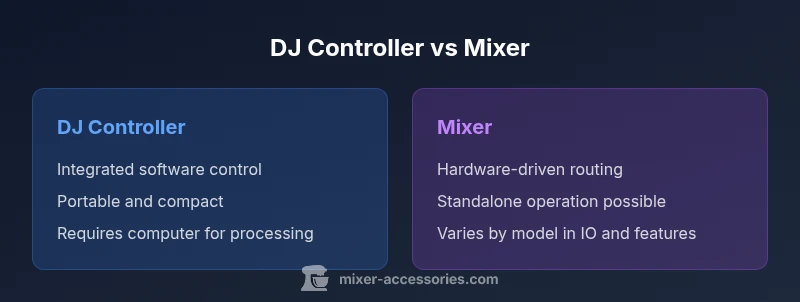
For most users, a DJ controller offers integrated software control with built-in sound and a compact surface, while a traditional mixer emphasizes standalone audio routing and hardware processing. The key difference is that controllers merge software and hardware into one unit, whereas mixers focus on hands-on mixing and external systems. The choice depends on whether you need laptop-based software control or a self-contained, live-performance setup. See the full comparison below for deeper guidance.
Understanding the Core Roles
The terms 'DJ controller' and 'mixer' describe two different approaches to managing audio and performance. In practice, a DJ controller combines a hardware surface with software inside your computer, typically linked to a DJ program such as Serato, Rekordbox, or Traktor. A mixer is primarily a hardware device that handles analog-style signal routing, channel mixing, and effect processing. When evaluating the difference between dj controller and mixer, focus on how each handles three core tasks: input sources, control surface, and output routing. According to Mixer Accessories, many home studios start with a controller to simplify the learning curve and software workflow, then expand to a standalone mixer if live performance demands hardware-only operation. The distinction matters for workflow, flexibility, and upgrade paths, and it is a foundational decision for any aspiring DJ or audio hobbyist.
How a DJ Controller Works
A DJ controller functions as the interface between your DJ software and your performance surface. It includes tactile jog wheels, faders, knobs, and pads, but the actual audio processing happens in the software running on your computer. The controller sends control signals to the software, which handles track playback, cueing, effects, looping, and beat-matching. For the difference between dj controller and mixer, the controller’s primary advantage is the seamless software integration: you can experiment with effects, samples, and library management without leaving your laptop. Most controllers ship with bundled software licenses or have companion apps, making them a practical choice for beginners who want immediate hands-on practice. This setup is common in home studios and portable setups where space and simplicity are priorities.
How a Standalone Mixer Works
By contrast, a traditional mixer focuses on analog signal routing, EQ, and level control via physical channels. A standalone mixer typically accepts multiple audio sources—microphones, instruments, external players—and blends them in real time using faders, knobs, and built-in EQ. Some mixers include USB audio or built-in effects, but many rely on external interfaces or devices for digital processing. The difference between dj controller and mixer becomes clear here: the mixer emphasizes tactile, direct control over sound with fewer dependencies on a computer. For live performances, a mixer can simplify stage setups because it can operate without a computer, route multiple mic and line inputs, and feed multiple outputs to monitors or a PA system. Hence, a mixer excels in hardware-centric rigs and club environments.
Core Differences in Hardware and Interface
Hardware design often defines how you interact with sound. DJ controllers are compact, all-in-one surfaces that integrate with DJ software, offering 2-4 channels, built-in USB audio (in many models), and MIDI/HID control over software parameters. Edge cases exist where a controller offers more channels or standalone effects, but the core idea is software-driven mixing. Standalone mixers focus on physical control with multiple channels, dedicated EQ knobs, cueing for each input, and often a modular footprint for rack mounting. In terms of user experience, controllers rely on your computer as the processing brain, while mixers deliver immediate signal processing without relying on a computer. When considering the difference between dj controller and mixer, the decision often comes down to whether you prefer a software-driven workflow or hardware-centric performance.
Software Integration and Control Surfaces
One of the defining differences between a DJ controller and a mixer is software integration. DJ controllers map hardware controls directly to software parameters, allowing you to manipulate tracks, effects, and loops with tactile feedback. The surface is designed for performance: jog wheels for scratching, performance pads for hot cues, and faders for crossfading. A mixer, unless paired with a computer or external interface, operates at the signal level and lacks direct software control. However, many modern mixers offer USB connectivity to a computer or standalone recording capabilities. The best outcome depends on your use case: if you perform primarily with digital tracks and software effects, a controller provides the most efficient workflow; if you rely on analog inputs or want to minimize computer use during gigs, a mixer is often the better match.
Audio Routing, Interfaces, and Outputs
Hardware routing is different between the two. A DJ controller consolidates audio routing in a compact form and usually relies on the computer for final processing and output. In contrast, a mixer emphasizes signals distribution with dedicated master outputs, booth outputs, and sub-grouping options. When you consider the difference between dj controller and mixer, you should examine how many outputs you need (master, booth, record), whether you require a built-in sound card, and whether you’ll connect external effects processors. If you plan to perform in environments with limited space or rely on laptop-only setups, controllers offer a straightforward path. If your gigs require multiple mics and robust on-site routing without a laptop, a mixer provides the necessary flexibility.
Built-in Effects, Sampling, and Performance Features
Controllers frequently rely on software-based effects, loops, and sample playback, enabling a modern, feature-rich experience with minimal extra hardware. Many controllers include performance pads, tempo-sync, and hot cues that align with the software’s beat grid. Mixers may include built-in FX like delay, reverb, and isolator, but their effects are usually hardware-driven and tied to the channel being mixed. In the difference between dj controller and mixer, the choice hinges on whether you want a wide range of software-driven effects or sturdy, hardware-based effects that function without a laptop. For some users, the software environment offers more versatility, while others value the immediacy and reliability of hardware effects on stage.
Setup Scenarios: Home Studio, Bar, and Club
Your environment strongly influences which option makes sense. For a home studio and budding DJs, a controller provides an affordable, space-saving path to practice, learn software workflows, and build a library of cues and samples. For bars and clubs, a mixer can simplify live sound by handling many inputs, routing to power amplifiers, and delivering robust analog performance even if a laptop isn’t available. If your goal is to perform with the least number of devices, a controller with a capable laptop and software suite can cover most practice and small gigs. If you want to operate as a standalone, venue-ready setup, a mixer—with the right IO and outputs—can reduce reliance on computers.
Budget, Value, and Longevity Considerations
Budgeting for a DJ setup involves weighing the long-term value of software bundles, hardware life, and upgrade cycles. Controllers often come with bundled software licenses, which adds value but ties you to specific ecosystems. Mixers, especially high-end models, may command higher upfront costs but deliver durable hardware and stable performance without depending on a computer. Longevity matters: a sturdy metal chassis, reliable faders, and solid USB interfaces contribute to fewer maintenance headaches. When evaluating the difference between dj controller and mixer, consider not just the upfront price but the total cost of ownership over several years, including software updates, possible add-ons, and the expense of a dedicated computer or audio interface if needed.
Practical Guide to Choosing: Quick Checklist
Use this checklist to evaluate your needs quickly: (1) Do you plan to DJ primarily with digital tracks through software? If yes, prioritize a controller. (2) Do you need standalone capabilities for venues without a laptop? If yes, prioritize a mixer. (3) How many inputs will you need, and what outputs are required for headphones and booth monitors? (4) Is portability essential? (5) Are you comfortable navigating software and licensing? (6) Does your budget allow for bundles or modular expansion? (7) Do you value built-in FX vs software-based effects? (8) Will you expand into sampling or live looping? The goal is to align your setup with your performance context and workflow preferences.
Common Misconceptions Debunked
Many beginners assume that a controller will always sound better than a mixer or vice versa, which is not the core determinant of tone or quality. Both devices can deliver professional results when configured properly. Another misconception is that all controllers are USB-powered; some models require external power; likewise, not all mixers include USB audio. Finally, some users think you must choose between digital and analog entirely; in practice, many hybrid setups combine both to achieve the best of both worlds. Understanding these nuances helps you choose more confidently based on actual needs rather than marketing claims.
Comparison
| Feature | DJ Controller | Mixer |
|---|---|---|
| Built-in audio interface | Integrated USB audio (controller) | Model-dependent USB audio or none (mixer) |
| Software integration | Direct control of DJ software (via HID/midi) | Hardware-focused; software control is optional or via external interface |
| Channel count | 2-4 channels (typical) | 2-8+ channels (typical) |
| FX and performance features | Software-based effects and loops | Built-in FX on some models; more tactile routing |
| Portability | All-in-one compact units designed for portability | Varies by model; often larger and modular |
| Setup dependency | USB/software dependent; needs computer | Can run standalone with external sources |
| Price range | Mid-to-high depending on software bundles | Varies by model; generally hardware-centric |
The Good
- All-in-one control surface simplifies setup and transport
- Tight software integration speeds up workflow
- Portability supports practice and small gigs
- Bundled software adds immediate value for learning
Negatives
- Limited standalone functionality compared to dedicated mixers
- Quality of built-in interfaces varies by model
- Upgrade paths often require new hardware or software licenses
- Reliance on a computer can introduce latency or stability concerns
DJ controller generally wins for beginners and laptop-based workflows; mixers excel for standalone, hardware-centric performances
Choose a controller if you want quick setup and software-driven control. Choose a mixer if you need robust, laptop-free performance and advanced routing for live gigs.
Your Questions Answered
What is the primary difference between a DJ controller and a mixer?
The primary difference is that a DJ controller combines a hardware surface with software control on a computer, while a mixer focuses on hardware-based signal routing and mixing without requiring a computer. Controllers rely on software for processing, whereas mixers handle most tasks in hardware. This distinction shapes your workflow, portability, and upgrade path.
The controller fuses hardware with software, while a mixer is mainly hardware-based and can work without a computer. This choice changes how you work and what you can upgrade later.
Can I use a DJ controller without a laptop?
Most DJ controllers are designed to work with a computer and DJ software. Some models may offer limited standalone capabilities, but full operation generally requires a laptop or desktop. If you need true laptop-free performance, a dedicated mixer is often more suitable.
Most controllers need a laptop for full use. If you want laptop-free gigs, a stand-alone mixer is usually better.
Are built-in effects on controllers better than those on mixers?
Effect quality often depends on the software or hardware design. Controllers rely on software effects, which are highly versatile, while mixers offer hardware effects that can be more consistent in live conditions. Your choice should match your performance style and environment.
Software effects on controllers are versatile; built-in hardware effects on some mixers offer reliability in live settings.
Which is more affordable for beginners?
Beginners typically find entry-level controllers cheaper upfront due to bundled software and compact designs. However, total cost depends on the software licenses and potential need for an external audio interface. Compare bundles and long-term costs before deciding.
Entry-level controllers are usually cheaper upfront, but total cost depends on software licenses and any extra gear.
Do I need both a controller and a mixer?
Not necessarily. If you perform primarily with digital tracks and a laptop, a controller often suffices. If you perform in venues with limited computer access or require extensive on-site routing, a mixer or a hybrid setup may be appropriate.
Most users pick one based on their workflow; only some setups benefit from a hybrid approach.
Top Takeaways
- Start with a controller for learning and software workflows
- Choose a mixer for hardware-centric, standalone gigs
- Evaluate channel count and IO needs before buying
- Consider software licenses when budgeting
- Test both options if possible to match your performance style