Difference Between a Mixer and a Console
Learn the essential differences between a mixer and a console, with practical guidance for home cooks, bar enthusiasts, and audio hobbyists. Explore usage scenarios, workflows, and buying tips to choose the right tool for your setup.


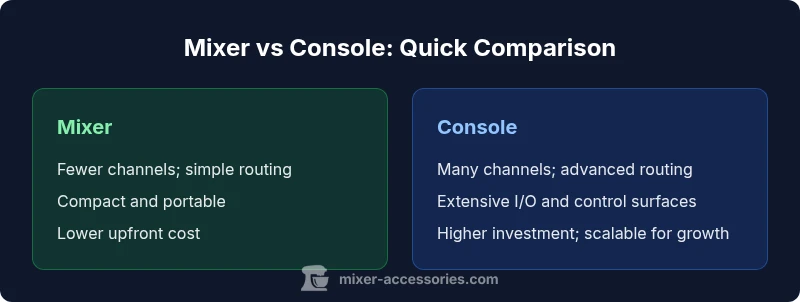
Understanding the difference between a mixer and a console helps you select the right tool for your setup, whether you’re a home cook, bar enthusiast, or audio hobbyist. In short, a mixer blends multiple inputs with basic routing, while a console provides more channels, advanced routing, and finer control for live sound or studio work. The choice hinges on complexity, budget, and long‑term goals.
What is a Mixer?
A mixer is a signal‑routing device designed to blend several audio sources into one or more outputs. Mixers come in both analog and digital varieties, and they range from compact 4‑ to 8‑channel portable units to larger, more capable models. For home recording, bar setups, or small live performances, a mixer can handle basic input management, channel level control, and simple effects sends. The essential strength of a mixer is its hands‑on simplicity: you adjust faders, pan, and auxiliary sends to sculpt the overall blend with a minimal setup. According to Mixer Accessories Team, most hobbyists benefit from a mixer when they want tactile control without navigating a deep menu tree. In practical terms, expect fewer channels, simpler routing, and straightforward gain staging that’s easy to learn and implement on a tight schedule.
What is a Console?
A console, in contrast, is a more robust cornerstone of professional sound systems. It typically offers a higher channel count, extensive routing options, sophisticated metering, and often a more expansive control surface. Digital consoles add features like recallable scenes, multi‑effect integration, and advanced DAW‑link capabilities, while analog consoles emphasize real‑time character and immediate tactile feedback. Consoles are common in venues, broadcasting environments, and larger studios where complex signal paths, precise EQ, dynamics, and subgroups are essential. The trade‑off is increased complexity and cost, but the benefit is scalability and flexibility for demanding live and recording workflows.
Key Terms You Should Know
To understand how a mixer and a console differ, you should be fluent in a few core terms:
- Channel strip: The vertical arrangement of gain, EQ, dynamics, and routing for a single input.
- Aux/monitor sends: Outputs used for effects like reverb or for feeding floor wedges/in‑ear monitors.
- Bus and subgroup: Internal signal paths that allow you to route multiple channels together for processing or output.
- Fader vs. control surface: Physical sliders vs. a larger, more feature‑rich panel with meters, controls, and sometimes touchscreens.
- Recall and scenes: The ability to store and instantly return to specific setups, common in digital consoles.
Understanding these concepts helps you compare devices on the same terms and prevents overestimating what a given unit can do in your setting.
Core Distinctions: Channel Count, Routing, and Control
The central differences revolve around three pillars: channels, routing complexity, and the control surface. Mixers typically offer fewer channels, enabling quick setup and reliable performance for basic tasks like mic’ing a small band or podcasting station. Routing is straightforward—signals go from inputs to outputs with limited subgroups. Consoles, especially large‑format or digital varieties, provide dozens of channels, intricate routing matrices, and advanced control options, including programmable scenes and deep plugin integration. The control surface on a console is designed for long sessions and complex mixes, often featuring larger meters, more assignable controls, and enhanced ergonomics that reduce listener fatigue during extended performances or sessions.
When to Use a Small-Format Mixer
If your goals are simple live sound for a small gig, a basic podcast, or a compact home studio, a small‑format mixer is typically sufficient. It offers fast setup, immediate feedback, and enough channels for a few mics, instruments, and playback devices. You’ll appreciate the tactile control and reliable performance without needing a steep learning curve. For occasional events or streaming setups, a budget‑minded mixer can deliver professional results with minimal hassle. The key is to match channel count and input types to your actual needs and avoid overbuying features you won’t use.
When to Use a Full-Featured Console
For venues, multi‑input live events, broadcast environments, or professional studios, a console shines where routing depth and expansion matter. A console handles large numbers of sources, complex subgroups, and precise signal paths. It supports advanced EQ, dynamics, and effects at the source, reducing the dependency on external processors. Digital consoles, in particular, enable recallable scenes, seamless DAW integration, and sophisticated offline editing workflows. If your work requires consistent, repeatable setups, a console’s scalability and recallability often justify the higher investment.
Practical Workflows: Live Performance vs Studio Use
In live performance scenarios, a mixer can provide reliable, repeatable results with quick adjustments on stage. For studio work, a console can offer deeper control of signal routing, precision EQ, and the ability to manage multiple takes across several tracks. The workflow mindset shifts: live work prioritizes speed, feedback management, and stage monitoring; studio work emphasizes precise tone shaping, track integrity, and compatibility with DAWs. Both tools can coexist in a hybrid setup, with a console driving main outputs and a compact mixer handling submixes or in‑room monitoring. The benefit of awareness here is that you select the system that aligns with your primary environment and future growth plans.
Feature-by-Feature Reference: Quick Guide
A practical cheat sheet helps you compare features side by side. Channel count, routing depth, control surface size, metering clarity, I/O options, and price are the most impactful factors. Consider whether you need recallable scenes, DAW integration, or external effects processing. For home cooks or bar enthusiasts, the decision often comes down to size, ease of use, and maintenance. For audio hobbyists, evaluate whether you’ll benefit from expansive routing and the ability to manage complex live or studio scenarios over time.
Budgeting Considerations and Long-Term Costs
Budgeting for a mixer versus a console goes beyond sticker price. A mixer may cost less upfront, but you should consider long‑term needs such as reliability, spare parts, and the ability to expand with add‑ons. Consoles typically demand higher initial investment, and you should plan for future upgrades, maintenance, and possible software licenses. Remember that installation, cables, and furniture (rack mounts, stands, and consulting if needed) add to the total cost. A practical approach is to map your expected growth over 2–5 years and choose a platform that accommodates that trajectory without forcing a complete overhaul.
Integration with Other Gear: Interfaces, DAWs, and Effects
Both mixers and consoles can pair with external audio interfaces, DAWs, and effects processors, but integration depth varies. Digital consoles often offer native DAW control, time‑code sync, and plugin ecosystems, which can streamline production. Analog consoles excel at immediate analog warmth and low latency paths, but they may need external devices for virtual effects or DAW recall. For home studios, consider your ecosystem: USB/FireWire/Thunderbolt interfaces, preferred DAWs, and the types of effects you rely on. A sound plan includes cable management, routing diagrams, and a backup workflow for critical gigs or sessions.
Mixer Accessories Perspective from Mixer Accessories Team
From the Mixer Accessories perspective, choosing between a mixer and a console hinges on how you balance hands‑on control with future needs. For many home cooks and bar enthusiasts, a compact mixer offers the simplest path to great sound. For hobbyists who value scalability and flexibility, a console provides a longer‑term upgrade path and more precise control. The Mixer Accessories Team emphasizes testing in real scenarios: replicate your typical gig or session, verify headroom, check for latency, and ensure the device integrates with your DAW and playback sources. This practical approach helps you plan around your actual use case rather than speculative capabilities.
How to Decide: A Step-by-Step Framework
- List all input sources (mics, instruments, playback). 2) Estimate required channel count and routing depth. 3) Decide on whether recallability and DAW integration are essential. 4) Consider portability, installation, and maintenance. 5) Set a realistic budget that includes peripherals. 6) Test devices in a setup close to your real environment. 7) Choose the option that best fits your primary workflow while allowing future growth.
Comparison
| Feature | Mixer | Console |
|---|---|---|
| Channel count | Low-to-moderate channels | High channel counts and subgroups |
| Routing complexity | Simpler, direct signal path | Advanced routing with buses and subgroups |
| Control surface & metering | Compact controls, basic meters | Large, comprehensive meters and assignable controls |
| Inputs/Outputs | Fewer I/O, quick setups | Extensive I/O with multiple outputs and returns |
| Portability | Typically lighter and portable | Generally heavier and rack‑mount capable |
| Best for | Small venues, home studios, streaming | Live sound, studios, larger venues |
| Price range | Lower upfront cost options | Higher investment with scalable options |
| Upgrade path | Easier to scale with submixers | More scalable with add‑ons and recallable scenes |
The Good
- Lower upfront cost for basic setups
- Faster learning curve and easier operation
- Compact, portable options for on‑the‑go use
- Tactile controls that many users prefer
Negatives
- Limited routing depth and expansion potential
- Fewer channels for complex mixes
- Less precise control in demanding live environments
- Often fewer DAW integration features
Mixer is ideal for simple, affordable setups; a console suits complex, scalable live/studio workflows
Choose a mixer when you value speed, simplicity, and portability. Opt for a console if you need extensive routing, recallability, and future growth.
Your Questions Answered
What defines a mixer vs a console?
The key difference is scale and routing power. A mixer handles basic input blending with straightforward routing, while a console provides more channels, sophisticated routing, and advanced control surfaces for complex live or studio environments.
The mixer blends a few inputs with simple routing, while the console offers more channels and deeper routing for bigger jobs.
Can a mixer be used as a console for live sound?
A mixer can serve basic live sound needs, but it lacks the advanced routing and recall features of a full console. For simple events, a mixer may suffice; for complex setups, a console is preferable.
A mixer can handle simple live tasks, but for complex shows you’ll want a console.
Is analog or digital better for mixers and consoles?
Analog gear is often valued for hands‑on feel and warmth, while digital gear offers recall, DAW integration, and more routing options. Your choice depends on budget, workflow, and the need for repeatable setups.
Analog feels classic; digital offers recall and deeper routing—choose based on your workflow.
What should I consider when buying?
Evaluate channel count, routing depth, control surface size, compatibility with your DAW, and future expansion plans. Also consider the physical footprint, power needs, and ongoing maintenance.
Focus on channels, routing, and future growth when buying.
Do I need a console for recording?
Not always. Home studios often use mixers for hands‑on control or submixing while the DAW handles multi‑track recording. A console can be advantageous if you require extensive routing and recallable workflows in the studio.
It depends—mixers work for many home setups; consoles help with complex recording tasks.
What about maintenance and support?
Maintenance quality depends on build and brand. Look for reliable parts, available service, firmware updates (for digital units), and accessible customer support.
Check parts availability and support when choosing gear.
Top Takeaways
- Assess your channel needs before buying
- Prioritize routing depth for live/studio work
- Balance budget with long‑term growth plans
- Test gear in real‑world setups
- Consider DAW and interface integration early