Mixer and Microphone: A Practical Side-by-Side Guide
A rigorous comparison of mixer and microphone setups for home studios, bars, and podcasts. Learn connectivity, sound control, latency, budgeting, and setup tips to choose the right kit for your goals.


Overall, a separate mixer plus microphone setup generally delivers more control, routing options, and higher fidelity than a single USB kit. If you want to grow a home studio or podcast with future upgrades, this is the safer long-term choice. Start with a reliable mic and a compact mixer with basic EQ and gain control.
Defining the Core Concepts
A mixer is a device that blends multiple audio sources, controls levels, and routes signals to outputs. A microphone is the pickup device that converts sound into an electrical signal. When you pair a mixer with a microphone, you gain control over gain staging, equalization, panning, and external effects before the signal reaches your computer, recorder, or live sound system. For hobbyists and professionals alike, the phrase mixer and microphone represents a versatile pairing that supports podcasts, live streams, music recording, and voiceover work. In practical terms, you’ll choose a mic type based on your voice and environment (dynamic mics for isolation, condenser mics for sensitivity), and select a mixer that provides the appropriate input count, phantom power, and routing options. This article compares common configurations to help you decide what to buy first and how to expand later, without assuming prior expertise. According to Mixer Accessories, input flexibility and stable build are top priorities for hobbyists.
Core Differences: USB All-in-One Kits vs Separate Mixer + Mic
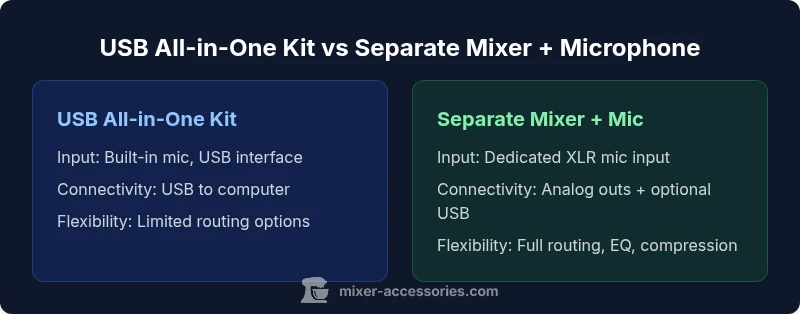
Two popular pathways exist for small studios and hobby setups. USB all-in-one kits pair a basic mixer-like interface with a built-in microphone or a single USB mic, delivering plug-and-play simplicity. The alternative is a separate mixer with an external microphone chosen for your needs; this route typically demands more setup but unlocks deeper routing, EQ, and higher fidelity. The choice hinges on whether you value speed and portability or control and expandability. In practice, most beginners start with a USB kit for ease, then migrate to a separate mixer and microphone as their goals become more ambitious.
How Component Choice Affects Sound Quality
Sound quality is driven by mic choice, preamp quality, and signal path. A dedicated mixer offers higher-end preamps and more precise gain control, which helps avoid clipping and reduces noise. The microphone you select matters just as much: a dynamic mic might excel in a noisy room, while a condenser mic captures detail in a treated space. When you pair a quality microphone with a capable mixer, you gain consistent tone shaping through EQ and compression, plus the ability to route signals to multiple outputs for different uses (recording, streaming, live sound).
Practical Use Cases: Home Studio, Bar Setup, and Podcasting
For a home studio, a mixer and microphone setup supports multi-track recording, vocal tracks, and instrument mics with clean routing to your DAW. In a bar or cafe, the same gear supports background music, live karaoke, and on-site podcasts with reliable gain staging. For podcasts and voiceovers, you can tailor the mic’s proximity effect, apply light compression, and route the signal to headphones for monitoring without latency surprises. The flexibility of a separate mixer shines when you add more mics or instruments over time, while USB kits deliver a rapid, portable, all-in-one solution.
Connectivity and Latency: What You Need to Know
Connectivity choices shape ease of use and latency. USB kits plug directly into a computer, minimizing setup steps but often introducing bus-powered limitations. A traditional mixer with XLR mics connects to an audio interface or computer via dedicated outputs, which can introduce a small amount of latency depending on the driver and buffer settings. If you stream or record in real time, prioritizing low-latency pathways and reliable drivers is essential. Always check phantom power if you plan to use condenser mics, and ensure your cables are balanced where possible to reduce hum and RF interference.
Budgeting and Value for Money
Budgeting for a mixer and microphone involves balancing upfront cost with long-term needs. USB all-in-one kits tend to be cheaper upfront and portable, making them attractive for beginners or travelers. A separate mixer plus microphone setup typically costs more initially but offers greater upgrade potential—new mics, preamps, and routing options can scale with your ambitions. When evaluating value, consider how many inputs you’ll need, whether you require phantom power, and whether you plan to route signals to multiple destinations (recording, streaming, live sound). Research and comparisons help you pick a setup that remains viable as your skills grow.
Setup Workflows: Quick Start for Beginners
Starting with a USB kit can get you recording in minutes: plug in, select the USB device, and begin recording or streaming. If you opt for a separate mixer and microphone, lay out your workflow: pick a mic, connect to the mixer’s XLR input, route the main mix to your audio interface or computer, and set initial gains conservatively to avoid clipping. Gradually introduce EQ, compression, and effects to mold your tone. A simple, repeatable workflow saves time and reduces setup anxiety during live sessions.
Troubleshooting Common Issues
Latent hiss, hum, or crackling often points to a grounding problem or poorly shielded cables. Check the mic connection, cable quality, and XLR pin alignment. If the signal seems weak, re-check your gain staging in increments and verify that phantom power (for condensers) is engaged only when using a mic that requires it. For USB kits, ensure your computer recognizes the device and that any required driver software is up to date. When upgrading, test one variable at a time to identify the root cause of noise or latency.
Recording Scenarios: Vocals, Instruments, and Voiceover
Vocals benefit from a controlled gain environment and a mic with good proximity response. Instrument mics or line-in sources may require different EQ curves and routing for clean mixes. Voiceover tasks demand consistent tone and low noise, often favoring a dynamic mic in untreated spaces. A mixer lets you tailor levels across sources before they hit the recording path, reducing post-production time and enabling a more polished final product.
Sound Quality Factors to Consider
Key factors include mic type (dynamic vs condenser), preamp quality, and the overall impedance matching. The mic’s polar pattern and proximity effect influence tonal balance, while the mixer’s EQ, gain structure, and routing determine how cleanly signals co-exist. Even with a modest setup, disciplined gain staging and careful room treatment yield clearer recordings. If you expect growth, prioritize a mixer with expandable input count and solid preamps.
Upgrades: When to Mix in Upgraded Accessories
Upgrades should align with your goals. For podcasters, upgrading to a high-quality dynamic microphone and a preamp-boosted mixer can improve voice presence. Musicians seeking multi-instrument capability benefit from additional mic inputs and more flexible routing, including external effects. Before purchasing, map out your typical sessions and the adapters or cables you might need for future gear. A planned upgrade path reduces wasted investment and keeps your workflow smooth.
Testing Your Setup: Quick Checklist
- Confirm all cables are securely connected and free of visible wear.
- Verify gains are set to avoid clipping on loud passages.
- Check headphone monitoring for latency-free feedback.
- Test both quiet and loud sources to balance EQ and compression.
- Run a short recording to assess noise levels and frequency response.
- Confirm phantom power is active only if your mic requires it.
Comparison
| Feature | USB All-in-One Kit | Separate Mixer + Microphone Setup |
|---|---|---|
| Input options | Built-in mic + USB interface (plug-and-play) | Dedicated XLR mic input on a mixer; user selects mic |
| Connectivity | USB to computer (USB-C/USB-A depending on model) | Analog mixer outputs to audio interface or computer; optional USB interface |
| Latency | Very low, driver-free on many systems | Low to moderate depending on interface and buffer settings |
| Sound control | On-board gain and basic EQ; built-in effects possible | Comprehensive routing, EQ, compressor, external FX, and splits |
| Best For | Beginners, portable setups, quick streams | Enthusiasts, multi-mic recordings, expandable rigs |
| Price Range | $100-$250 | $300-$800 |
| Upgrade path | Limited to provided features | Modular upgrades: mics, preamps, and outputs |
The Good
- Low upfront cost for USB kits
- Portability and simplicity for on-the-go use
- Fewer devices to manage during live streams
- Quick setup with minimal configuration
Negatives
- Limited future upgrade potential
- Sound quality can be lower than a dedicated setup
- Fewer routing and expansion options
- Potential dependency on USB power and drivers
Separate Mixer + Microphone is preferred for growth and control
Choose the separate setup if you plan long-term growth, need flexible routing, and aim for higher fidelity. A USB all-in-one kit is ideal for beginners and quick-start streaming on a budget.
Your Questions Answered
What is the difference between a mixer and an audio interface?
A mixer blends multiple inputs and provides routing and tone shaping; an audio interface translates analog signals to digital for a computer. Some devices combine both roles, but dedicated equipment often yields better control and quality. Consider your needs and space when choosing.
A mixer blends several mics and instruments with knobs for tone. An interface gets that sound into your computer; you’ll often pair a mixer with an interface for best results.
Can I use a USB microphone with a mixer?
Yes, but you’ll typically need the mixer’s line-level outputs to feed into a computer or an interface. USB microphones are designed to connect directly to a computer; using them with a mixer can complicate routing and may negate some USB mic features.
You can, but it’s usually simpler to use a traditional XLR mic with the mixer and feed the signal into a computer via an interface.
Do I need an audio interface if I already have a mixer?
Not always. If your mixer has USB audio capabilities and can connect directly to your computer with suitable drivers, you might skip a separate interface. However, for higher fidelity, multitrack recording, or advanced latency control, a dedicated interface is often beneficial.
You might not need a separate interface if your mixer handles USB output well; otherwise, an interface improves sound and latency control.
What microphone type is best for podcasting with a mixer?
Dynamic mics are forgiving in untreated spaces and handle background noise well, making them popular for podcasts. Condenser mics capture more detail but require better room treatment and potentially phantom power. Your choice depends on room acoustics and voice characteristics.
For most podcasts, a dynamic mic is a solid, low-noise choice, especially in non-studio spaces; condensers are great if you can treat the room.
How do I route multiple mics through a single mixer for streaming?
Use the mixer’s multiple mic inputs and assign each to separate channels. Route the master output to your streaming software, and use post-fader effects if needed. This setup keeps levels balanced and gives you flexible control during live streams.
Plug each mic into its own channel, then route the main mix to your stream. Tweak levels on the mixer for clean sound.
Are dynamic mics better than condensers for home recording?
Dynamic mics are typically more forgiving in untreated rooms and handle loud sources well, while condensers offer higher sensitivity and detail in quiet spaces. Choose based on room acoustics and desired tone.
Dynamic mics are easier for rough spaces; condensers give you more detail in treated rooms.
Top Takeaways
- Assess your long-term goals before buying
- A separate mixer offers expandability and better tone control
- USB kits are best for portability and speed
- Match mic type and mixer features to your space
- Plan a clear upgrade path to maximize value