Difference Between a Mixer and a Controller: An Analytical Guide
A analytical comparison of mixers and controllers for audio setups, covering standalone operation, software integration, use-cases, and buying factors to help you decide.


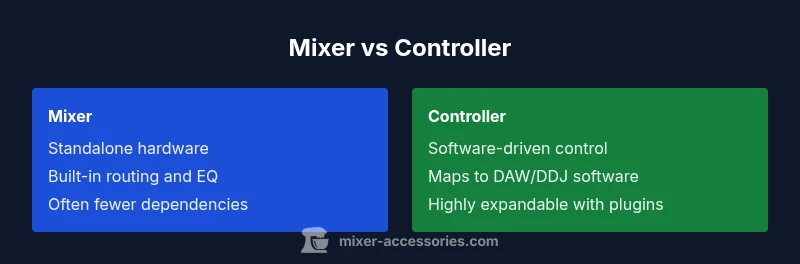
The difference between a mixer and a controller centers on standalone signal paths versus software-driven control. A mixer provides a complete, hardware-based routing and processing chain with multiple inputs and built-in EQ or effects, usable without a computer. A controller acts as a tactile interface that maps to software on a computer, offering flexible control and expandability but requiring a compatible DAW or DJ software. For many setups, the choice hinges on whether you prefer standalone operation or software-centric workflow.
What is the difference between a mixer and a controller?
Understanding the core distinction helps you plan a cohesive setup for home studios, live gigs, or podcasting rigs. The difference between a mixer and a controller is not just how they look, but how they handle signal flow, processing, and integration with software. A mixer is typically a standalone device with its own signal path, gain staging, EQ, routing buses, and often built-in effects. It can accept several microphones and line-level sources and output to loudspeakers or recording devices without a computer. A controller, by contrast, is a hardware surface that sends control data (MIDI or USB messages) to software running on a computer. It can map faders, knobs, and pads to software parameters so you can manipulate tracks, effects, and samples with precision. The Mixer Accessories team notes that most beginners start with a compact mixer for immediate, hardware-based mixing, then add a controller later to unlock deeper software control. The key is to align your choice with how you work: live sound, studio production, or hybrid setups that blend hardware and software.
The mixer: standalone signal path and built-in processing
A mixer is designed as a complete signal path. Each channel typically provides gain control, an input pad, a high- and low-frequency EQ, panning, and a send/return for effects. The master bus sums all channels for a final output that can feed speakers, a recording device, or a live-venue PA. Many mixers include useful extras such as built-in effects, talk-over (ducking), and simple routing options for subgroups. For live performance or field use, a mixer’s standalone operation means fewer external dependencies and less setup time. The trade-off is that you are limited by the hardware’s routing and effects, and expanding beyond its built-in capabilities may require additional gear. In practice, a mixer shines when reliability and speed are paramount, and the user preference leans toward tactile, hardware-driven control. The difference between a mixer and a controller becomes most apparent in how much you rely on software versus on-device processing.
The controller: software-centric control and expandability
A controller’s strength lies in software integration. It maps its physical controls to parameters inside a DAW or DJ software, enabling precise automation, sample triggering, and real-time effect manipulation. Because the controller itself often lacks a comprehensive signal path, you connect it to a computer or tablet and route audio through software. This architecture offers powerful editing, recall, and expansion through additional plugins and libraries. For producers and digital DJs who prefer deep customization and scalable workflows, a controller provides incredible versatility. The trade-off is a dependency on a computer and compatible software, plus the need to manage driver and buffer settings to minimize latency. The difference between a mixer and a controller becomes clearer when you weigh standalone grounding against software-driven flexibility.
Core differences in routing, processing, and expansion
Routing: Mixers provide hardware-centric, fixed buses and subgroups; controllers depend on software routing within the host application. Processing: Mixers often include EQ, dynamics, and basic effects in-hardware; controllers rely on software processing and plug-ins. Expansion: Mixers scale by adding more channels or external processors; controllers scale by pairing with more software and compatible surfaces. Best use cases: Mixers excel in standalone live sound and minimalist setups where reliability matters; controllers excel in studio workflows, post-production, and setups that benefit from customizable software control. The difference between a mixer and a controller can be summarized as hardware-internal vs software-extended control.
Use-case scenarios: When to pick a mixer vs a controller
- Live performance and venues: A mixer provides a self-contained, robust solution with straightforward routing and minimal latency concerns. The absence of a computer during a gig reduces failure points.
- Home studio and podcasting: A controller paired with a DAW often yields powerful editing and high recallability. You can automate mixes, apply plugins, and rapidly prototype ideas without rebuilding signal paths.
- Mobile or field setups: A compact mixer offers portability and battery or low-power options, while a controller keeps your software setup portable if you travel with a laptop.
- Hybrid workflows: If you expect to run live or recorded material from software, a controller can give tactile control in tandem with a small mixer for essential analog monitoring.
Key specs to compare and how they impact outcomes
When evaluating options, consider: channel count, mic preamps, gain headroom, EQ bands, built-in effects, and routing capabilities. A mixer’s preamps and EQ will influence vocal clarity and musical balance in live or recording contexts. A controller’s performance hinges on software compatibility, MIDI/USB map quality, and latency management. If you perform with external hardware, check whether the mixer offers insert points or subgroups that mirror your DAW’s bus architecture. Latency-sensitive tasks require stable drivers and appropriate buffer sizes, which is a software consideration that affects controller setups more than standalone mixers. Finally, price and upgrade paths differ: a budget mixer can cover small live rigs; a controller often enables expansion via software plugins and cover-ready workflows.
Setup workflows: from cabling to session
A typical mixer setup begins with audio sources plugged into line or mic inputs, followed by routing to the main output and, if needed, to a recording device or subgroups. For a controller-based workflow, you connect the controller via USB, install drivers or firmware, and map hardware controls to your DAW or DJ software. You’ll then configure input monitoring, driver buffer sizes, and software routing to ensure your faders correspond to the correct tracks or channels. In both setups, labeling inputs, testing gain staging, and saving session templates reduce confusion on future sessions. Mixer-focused workflows emphasize quick, clean handoffs; controller workflows emphasize recallability and precise software control. The difference between a mixer and a controller becomes most evident during setup speed and how easily you can reproduce the session.
Common pitfalls and how to avoid them
- Assuming you need a mixer for software control: A controller may suffice if your primary goal is software-driven mixing and automation.
- Overlooking latency: Controller setups depend on computer performance and driver stability; optimize buffer size and driver selections.
- Misaligning routing: Ensure your software routing mirrors hardware buses; mismatches create imbalanced cues and phase issues.
- Underestimating preamps: A good mixer preamp makes a noticeable difference on vocal clarity and instrument tone. Consider mic compatibility and headroom.
- Skipping templates: Save channel layouts and effect chains as templates to speed up future sessions. The difference between a mixer and a controller often becomes a matter of workflow consistency and software readiness.
Budget considerations and buying guide
Budgeting for either option requires prioritizing core needs. A compact, entry-level mixer is typically a lower upfront cost for standalone operation, ideal for small venues or podcasts. A controller, while potentially more expensive upfront, unlocks software-centric workflows and scalable growth through plugins and DAW upgrades. When choosing, weigh your long-term plans: Do you expect to perform live with minimal computer dependence, or will your work rely heavily on software and automation? Consider compatibility with your preferred DAW or DJ software, and plan a clear upgrade path (e.g., add more channels, upgrade to higher-quality interfaces, or expand with external effects).
Example configurations for typical setups
- Small home studio with a mixer: A compact 4-6 channel mixer acts as the main hub for mics and instruments, with a basic USB interface for recording. Simple external effects and a monitored playback path keep the setup straightforward.
- DJ setup with a controller: A controller paired with DJ software and a dedicated audio interface provides flexible beat-matching, cueing, and effects with modular expansion through plugins.
- Podcaster setup with a hybrid approach: A small mixer for on-air mic control and a controller to manage software transitions can combine the reliability of hardware with software recall. These configurations illustrate how the difference between a mixer and a controller influences layout and workflow.
Comparison
| Feature | Mixer | Controller |
|---|---|---|
| Core purpose | Standalone hardware for mixing signals with built-in routing | Hardware surface mapping to software in a computer-based workflow |
| Patching/Routing | Hardware buses, subgroups, and master output with possible analog effects | Software routing via DAW or DJ software with MIDI/USB control |
| Built-in processing | In-hardware EQs, dynamics, and sometimes effects on each channel | Minimal built-in processing; relies on software plugins and effects |
| Latency considerations | Low latency in standalone operation; depends on internal design | Latency depends on computer, drivers, and buffer settings |
| Upgrade path / Expandability | Add channels or external processors; hardware-based expansion | Scale with software, plugins, and additional control surfaces |
| Best for | Live sound, portable setups needing standalone reliability | Studio production, DJing with software, and highly customizable workflows |
The Good
- Standalone operation reduces reliance on a computer
- Clear, immediate control with tactile hardware
- Reliable for live performance with minimal setup
- Hardware routing can simplify monitoring and submixing
- Immediate on-hardware feedback without software load times
Negatives
- Limited to built-in features; expanding may require new gear
- Higher upfront cost for robust standalone units
- Less flexible than software-driven workflows for editing
- Firmware updates can affect performance and compatibility
Choose a mixer for standalone reliability and live setups; choose a controller for software-driven flexibility and upgradability.
Mixers win when you need immediate, hardware-based mixing without a computer. Controllers win when you want deep software integration and scalable workflows. The right choice depends on your primary workflow and future growth.
Your Questions Answered
What is the primary difference between a mixer and a controller?
The primary difference is hardware independence. A mixer provides a complete signal path with inputs, routing, and onboard processing, usable without a computer. A controller maps hardware controls to software running on a computer, offering deep software integration but requiring a host system.
A mixer works by itself for mixing. A controller lets you control software on a computer with tactile knobs and faders.
Can a controller replace a mixer in a live setting?
In many cases, a controller alone is not ideal for standalone live sound because it relies on software. If you need immediate, hardware-based mixing on stage, a mixer is typically preferable. Some hybrids exist, but they add complexity.
Controllers can work live with software, but many gigs still favor a dedicated mixer for reliability.
Do mixers have built-in effects?
Many mixers include built-in EQ and some effects on the channel strips or master bus. Not all models feature effects, so check the spec if you rely on onboard processing.
Some mixers have built-in effects; others rely on external gear or software.
Are DJ controllers suitable for studio production?
DJ controllers are designed for performance and software control; they can be used in studio production, but you’ll typically benefit from additional plugins and a solid audio interface to maximize precision and recall.
They can be used in studios, but software plugins are usually needed for full production work.
Is it better to buy one all-in-one unit or separate pieces?
All-in-one units reduce clutter and setup time but limit customization. Separate pieces offer better expandability and specialized quality, at the cost of more complex wiring and potential compatibility issues.
All-in-one units are simpler; separate gear gives you more room to grow.
Do I need a computer to use a controller?
Most controllers require a computer or tablet running compatible software. If you aim for standalone hardware operation, a mixer is the better choice.
Yes, usually a computer is needed to drive a controller.
Top Takeaways
- Start with your core workflow: live standalone vs software-centric
- A mixer offers built-in routing and processing; a controller focuses on software control
- Plan for expansion: hardware upgrades vs software plugins
- Test latency and driver stability before committing
- Balance cost with long-term needs and reliability